The reservation period is over; use the launch access rules now
Blizzard announced World of Warcraft: Forever live on November 4. The pre-launch reservation instructions below are now historical: their three-character limit described early reservation, and should not be presented as a verified limit for ordinary character creation after launch. Access at launch is included with a WoW subscription or Game Time.
If you arrive here looking to start today, select the Forever client and the correct WoW account, then use the current character-creation options. Do not buy an optional upgrade solely to enter an expired reservation window. Blizzard’s upgrade page describes Invite-A-Friend Launch Codes for November 4–11; we have not confirmed an extension beyond that advertised period. Check current account access before diagnosing a name rejection. The naming explanations below remain separated from the expired promotional window.
Source: Developer update checked November 12, 2026 · Blizzard · launch access and November 4–11 friend-code window
Historical reservation workflow (October 27–November 3)
WoW: Forever name reservation uses the game client. Eligible players create characters during the reservation period, with a maximum of three across all Rulesets combined. Creating one on Normal and two on PvP uses the entire early allocation; changing Rulesets does not provide another three slots.
- Open the Battle.net desktop app and finish any app update. Select World of Warcraft.
- Use the Game Version selector above Play to choose World of Warcraft: Forever. Install that version if necessary.
- Launch it with Play, choose the Ruleset you intend to use, then create a character with your chosen full name.
- Repeat only for the remaining characters you want within the shared three-character allowance.
Source: Blizzard’s reservation workflow
Historical early-reservation account eligibility
The early-reservation benefit is included with the Skyborne Heroic Pack, Skyborne Epic Pack and Warcraft Forever Collection. Blizzard’s reservation footnote also identifies the Digital Upgrade or Collector’s Edition and says the benefit belongs to the specific WoW account for which it was purchased. Check that account before troubleshooting the client.
A subscription or Game Time provides access to Forever at its November 4 launch. Early name reservation is an upgrade benefit, so ordinary launch access alone should not be treated as proof that an account qualifies for this earlier window.
Source: Upgrade benefits and launch access · Account-specific eligibility footnote
Prepare two names, plus a backup combination
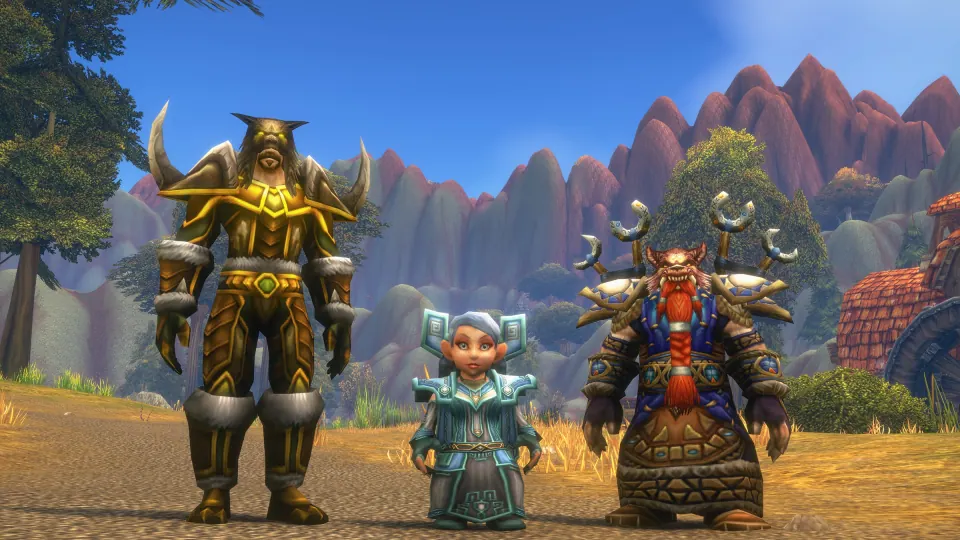
Forever checks the complete two-part name for uniqueness within your region. A first name used by another player can still be available with a different second name. The two parts are also checked together against naming restrictions; splitting a prohibited term between the fields does not bypass those rules.
Before opening character creation, write down a preferred combination and two alternatives for each character. For example, an invented first name could stay the same while you try different surnames. These are planning choices, not a claim that any particular combination is available.

Source: How full names are evaluated
Agree on the Ruleset before spending a slot
Friends need characters in the same Ruleset to group for quests, dungeons and raids; Horde and Alliance also remain separate. Blizzard says you cannot freely switch a character between Rulesets. On PvP, one account cannot create characters for both factions in that Ruleset.
The October 22 update added Roleplay-PvP to the launch plan and said Blizzard intended to offer it during early reservation. Hardcore is scheduled for after launch. Use the choices actually available in your client rather than assuming every announced Ruleset is ready.
Source: Ruleset and faction restrictions
You can hide the second name above your character
The published display setting is Escape → Options → Nameplates → My Secondary Name. Turn that option off to hide the second name in the world. It remains visible in chat, so this preference does not turn your character into a single-name identity.
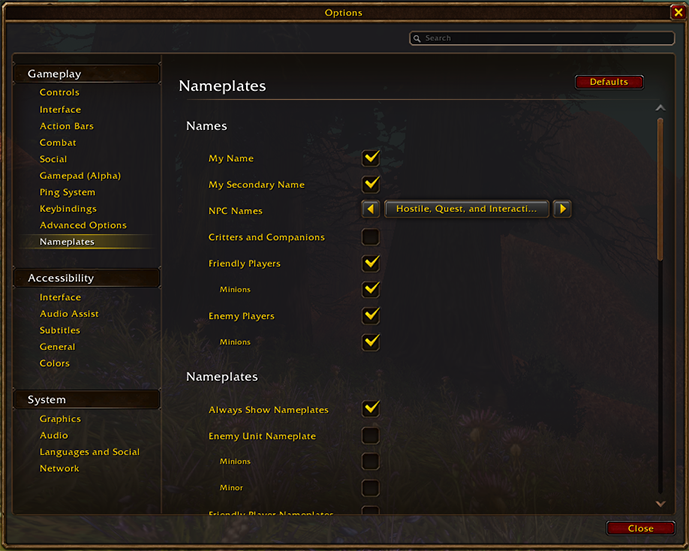
Source: Secondary-name display setting
Historical reservation dates and useful login details
Blizzard’s English-language notice lists October 27 through November 3, 2026. Korea and Taiwan have October 28 local opening dates. Check your region’s official notice for its ending date; the English reservation announcement gives opening times but no exact closing hour.
If login fails, record the error, selected game version, region and WoW account before looking for support. That separates a client or access problem from a rejected name. This guide verifies the published procedure; it does not establish current server availability or promise that a name will remain free.
Source: Official reservation schedule · Reservation announcement and updates · World of Warcraft: Forever official website
Sources & scope
This article uses the official and individually identified community references linked below. It is not a hands-on review. Screenshots are credited to their original publishers; they are not evidence that we tested these steps. Game details can change after publication.
- Blizzard · character name reservation instructions (20 Oct 2026)
- Blizzard · two-part names and display settings (21 Sep 2026)
- Blizzard · Ruleset choices, updated October 22 (22 Oct 2026)
- Blizzard · upgrade benefits and launch access (12 Sep 2026)
- Blizzard · October 23 weekly news and reservation schedule (23 Oct 2026)
- Developer update checked November 12, 2026
- Blizzard · launch access and November 4–11 friend-code window
Sources checked: 12 Nov 2026. Read how we use sources and AI assistance.