Choose what the delivery is for
Factorio 2.1 supports mixed rocket cargo and transfers between platforms in orbit. Start with the purpose of the request: constructing a platform, keeping it supplied, or transporting a product to another location. Those jobs need different filters even when the requested item is the same.
Source: Stable logistics features
Mixed rockets follow platform demand
The developer’s explanation says automatic silo requests can combine several requested items into one payload. Small requests are considered before bulk goods. Limited supply can affect packing, so a request is not a guarantee that the next launch contains exactly the quantities you imagined.
For a small construction job, list what is missing at the destination and compare it with available supply. Repeatedly adding the same construction request will not create a missing item in the source network. Check inventory and the current payload before concluding you need another silo.
Source: Mixed-payload design and supply limits
Separate the location from the delivery source
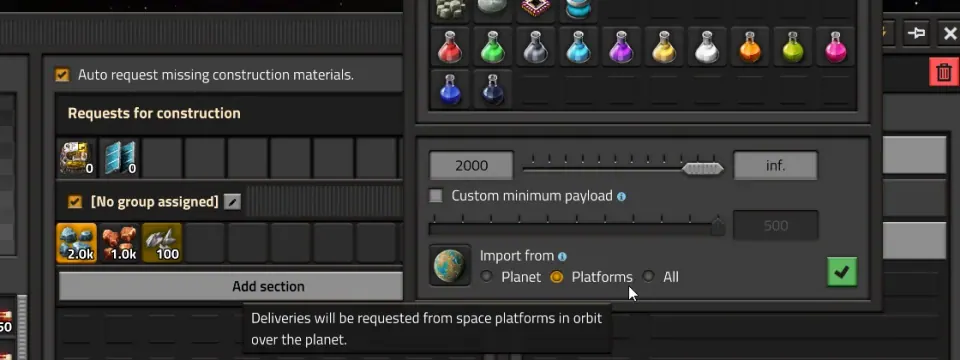
| Choice | Meaning in the developer explanation |
|---|---|
| Import from left blank | Import from any location; useful for supplies the platform itself needs. |
| Planet | Request deliveries from rocket silos on the planet. |
| Platforms | Request deliveries from platforms in orbit over the planet. |
| All | Allow both planetary and orbital platform sources. |
Source: Import settings and platform sources
A delivery worksheet
Use one row per purpose. The example below is an editorial planning template, not an imported blueprint or a calculated optimum.
| Purpose | Question to settle |
|---|---|
| Build the platform | Which construction items are actually missing? |
| Keep the platform running | Which supplies should stay aboard rather than be delivered away? |
| Move cargo between locations | Where should this product be collected and unloaded? |
| Transfer in orbit | Which platform is supplying the item, and which one requests it? |
| Clear unwanted stock | Where should it be dropped before departure? |
Inspect both sides of an orbital transfer
A requesting platform still needs a supplying counterpart. Check that the intended item is available and that the filters describe the intended source. If several locations or platforms could supply it, narrow the test until the delivery path is easy to follow.
A useful first experiment moves a small, recognizable quantity for one purpose. Watch the source inventory and destination inventory together. Once the path is understood, expand the request. This keeps a filter mistake from being buried inside a large logistics network.
A stopped platform may be clearing trash
The June explanation describes waiting to clear trash slots before leaving a location when a surface is available to receive the items. Check orbital drop status before changing the travel schedule. A waiting state can be part of delivery logic rather than a stalled engine.
Source: Trash-slot and drop-status behavior
Make each change answer a question
- Identify one unfulfilled request.
- Compare its location filter and source type with the intended route.
- Check supply at that source and space at the destination.
- Inspect the current delivery or drop status.
- Change one filter, observe the result and retain the previous setting in your notes.
Keep the version visible
These features belong to 2.1, with the stable status confirmed on October 23. We have not simulated a factory, measured optimal rocket packing or validated a modded logistics system. Use the separate upgrade checklist when returning from 2.0.
More for this game
Sources & scope
This article uses the official and individually identified community references linked below. It is not a hands-on review. Screenshots are credited to their original publishers; they are not evidence that we tested these steps. Game details can change after publication.
- Wube · 2.1 Stable (23 Oct 2026)
- Wube · Space logistics improvements (5 Jun 2026)
Sources checked: 26 Oct 2026. Read how we use sources and AI assistance.